Posts > Building Game with Phaser : Platformer
Building Game with Phaser : Platformer
May 17, 2026
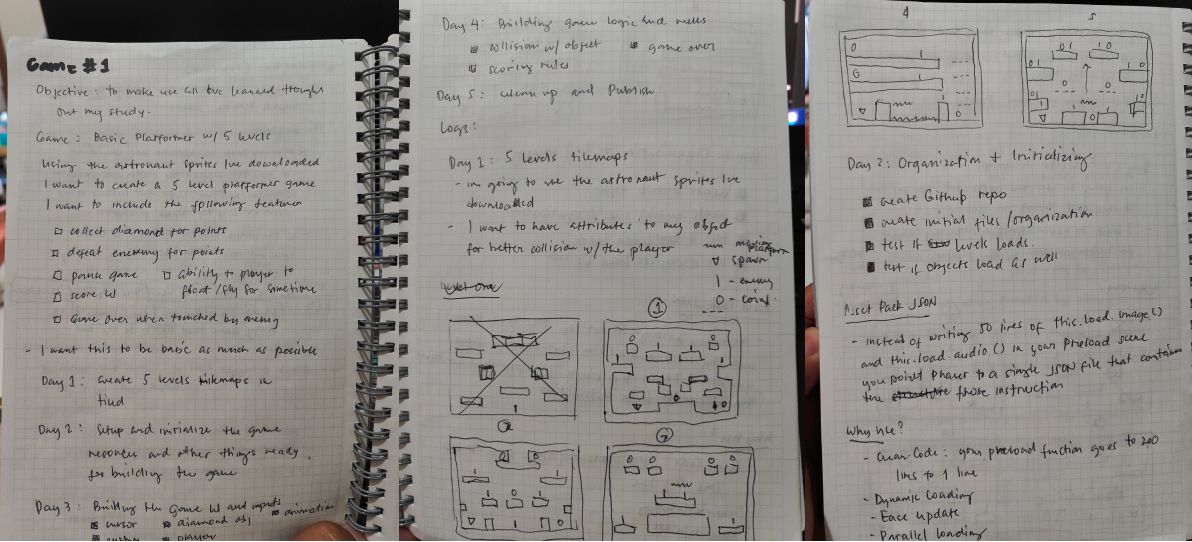
Start with a Plan
Every project I do starts with a plan, even though I have to adjust it along the way. I just wanted see the picture and in writing the things I wanted to do in a project. A to-do list of things that I’ll be needing to finish the project.
Why Platformer game?
The Phaser documentation and first game tutorial actually starts you with a platformer game to build. So its just easier to follow up on that while what I’ve learned are still fresh in my brain. I just uses different style, sprites and used new theme.
For me this is easier repeating the previous project that I’ve followed before, and just apply new stuff for additional learning.
What I’ve learned building the game?
In the player perspective the game is very simple and very easy. You’re just collecting things and avoiding moving obstacles, then move on to the next level and then you finished it after 5 levels. That is it.
But creating the game takes some time and research, sometimes you hit some issue that even AI cannot directly answer you unless you change all of your code. The learning process of game development is very long and I’m just starting and just learning the very basic part.
Here are some of things I’ve learn:
Phaser game is html <canvas/>
If you have used html canvas before the Phaser game will not be that overwhelming, I’ve used canvas before so putting things in the screen and moving them pixels by pixels are not new to me. The Phaser have a lot of things of course but it helps knowing few canvas knowledge.
Building a game is like directing a screenplay
You have to direct everything where the player should start, the enemy should move, the objects, the limitation of your objects, the opening and closing transition from first scene to the next scene.
Everything in pixels
Every time you move something dynamically is pixel based, even static text is pixel based.
Physics makes the your game world go round
It’s pretty interesting to work on physics object though a bit hard for my part as you have to learn math again and I just used on working building websites and applications, so there is not so much physics involved. So this time there’s new stuff I’m learning when it comes to doing code with physics and relearning math is plus.
Use Tiled for easy level creation
Tiled is a separate software that you can use to create your level. It’s very helpful on displaying your level so you can actually see it instead of laying down sprites one at a time in your code ( which you can do if you want ). With Tiled you can add layers of background, object and player spawn point. You can add attribute to your objects for collision and purposes so you don’t have to do it manually on your code.
Invisible wall is useful for limiting objects movement
Invisible wall can be added through the Tiled software this is very useful if you want to limit the enemies movement so they don’t drop down on a platform.
Animating things is easy if you have a good sprite sheet to use
You can download sprite sheet to itch.io they have a lot of you can use for your game development. Just don’t forget to give credit to the authors.
JavaScript classes and OOPs
As a web developer I’ve never really used Class based programming before with Javascript as I’m usually use libraries that usually are Function based like React, Vue, and Svelte. So Classes is new to me and I like learning it now as I think other game development tool uses classes based as well like Godot or Unity.
The “Finish” product
The game is very simple you use your right and left arrow key to move, up arrow keys to jump and space bar to use your jet pack. Then try to collect all pink diamonds in the level to move to the next one while avoiding moving enemies. That’s it, pretty simple.
You can try the demo in my itch.io account.
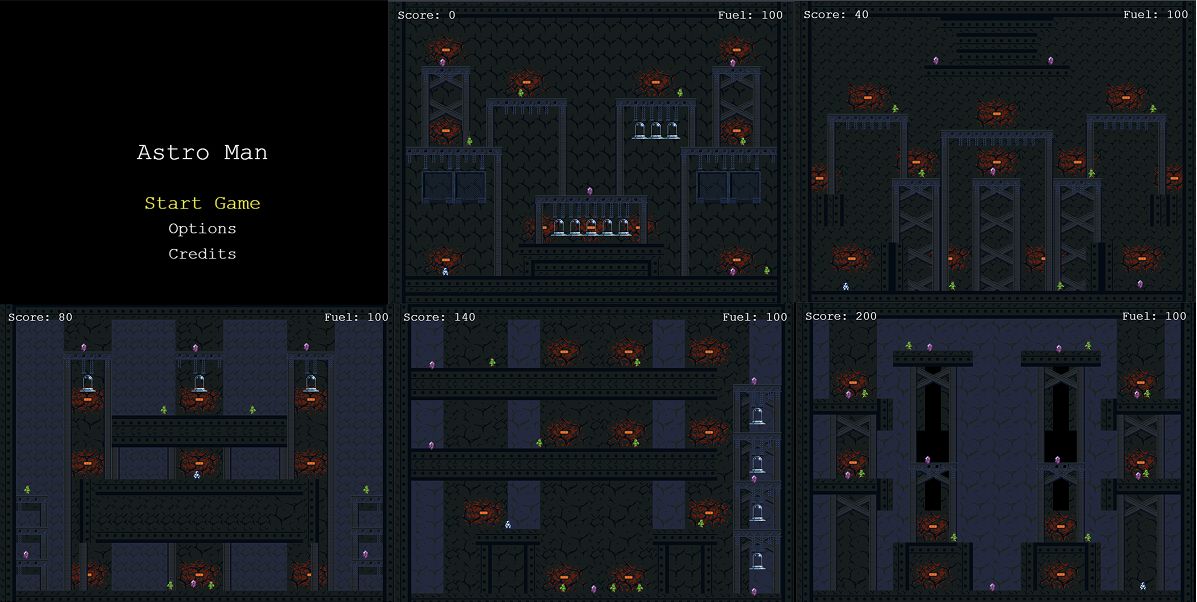
This game is enough for me and I don’t need to modify it anymore ( though there’s a lot of things myself wants to change but I wont be able to finish this ). I think for now these are enough as a proof and I want to try new kind of platformer game where camera is moving with the player.